Widgets
button
function button(text?: string): Button;A generic GUI button component.
Parameters
| Option | Type | Description | Required |
|---|---|---|---|
| text | string | The text of the button |
Streams
| Name | Type | Description | Hold |
|---|---|---|---|
| $text | string | Stream defining the button text | ✓ |
| $type | 'default' | 'success' | 'warning' | 'danger' | Stream defining the button type | ✓ |
| $click | undefined | Stream of click events | |
| $pressed | boolean | Stream of binary events indicating if the button is pressed | ✓ |
| $loading | boolean | Stream of binary events indicating if the button is in loading mode | ✓ |
| $loading | boolean | Stream of binary events indicating if the button is in loading mode | ✓ |
| $disabled | boolean | Stream defining if the input is disabled. | ✓ |
Screenshot

Example
const capture = button('Hold to record instances');
capture.title = 'Capture instances to the training set';

capture.$click.subscribe((x) => console.log('button $click:', x));
capture.$pressed.subscribe((x) => console.log('button $pressed:', x));fileUpload
function fileUpload(): FileUpload;A file upload component, that creates a stream of files.
Streams
| Name | Type | Description | Hold |
|---|---|---|---|
| $files | Stream<never()> | Stream of files |
Example
const myFileUpload = marcelle.fileUpload();
myFileUpload.$files.subscribe((x) => console.log('fileUpload $files:', x));imageUpload
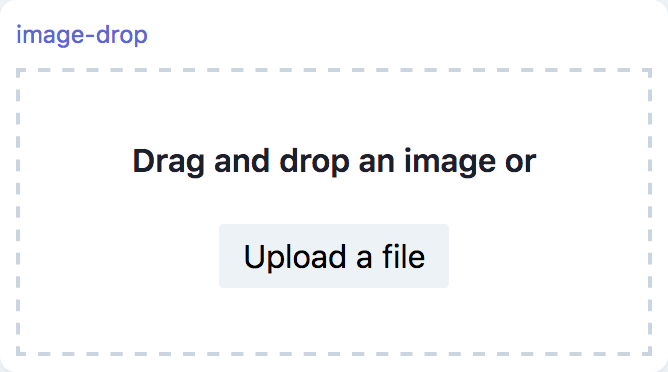
function imageUpload({ width?: number, height?: number }): ImageUpload;An Image upload component, that creates a stream of images and thumbnails. Images are cropped and rescaled to match the target dimensions, if these are non-zero, otherwise the dimensions are unchanged.
Parameters
| Option | Type | Description | Required | Default |
|---|---|---|---|---|
| width | number | Target image width | 0 | |
| height | number | Target image height | 0 |
Streams
| Name | Type | Description | Hold |
|---|---|---|---|
| $images | Stream<ImageData> | Stream of images in the ImageData format. | |
| $thumbnails | Stream<string> | Stream of thumbnail images in base64 dataURI format. |
Screenshot
Example
const imgUpload = marcelle.imageUpload();
imgUpload.$images.subscribe((x) => console.log('imageUpload $images:', x));modelParameters
function modelParameters(p: Parametrable): ModelParameters;This component provides an GUI for visualizing and adjusting parameters. It takes a Parametrable object as argument, which is an object (typically a model) carrying a parameters property which is a record of parameter streams:
interface Parametrable {
  parameters: {
    // eslint-disable-next-line @typescript-eslint/no-explicit-any
    [name: string]: Stream<any>;
  };
}The component will automatically display all parameters with appropriate GUI Widgets.
Parameters
| Option | Type | Description | Required |
|---|---|---|---|
| p | Parametrable | An object exposing parameters as streams to visualize and make editable | ✓ |
Screenshot

Examples
const classifier = marcelle.mlp({ layers: [64, 32], epochs: 20 });
const params = marcelle.parameters(classifier);

dashboard.page('Training').use(params);const parametrable = {
parameters: {
int: new Stream(12, true),
float: new Stream(-0.0000045, true),
intArray: new Stream(Array.from(Array(3), () => Math.floor(100 * Math.random()))),
floatArray: new Stream(Array.from(Array(3), () => Math.random())),
string: new Stream('test'),
menu: new Stream('three'),
bool: new Stream(false),
},
};
const p = modelParameters(parametrable, {
menu: { type: 'menu', options: ['one', 'two', 'three'] },
});number
function number(defaultValue?: number): Number;A generic GUI number input component.
Parameters
| Option | Type | Description | required |
|---|---|---|---|
| defaultValue | number | Initial value. Defaults to 0. |
Streams
| Name | Type | Description | Hold |
|---|---|---|---|
| $value | number | Stream defining the input's value | ✓ |
| $disabled | boolean | Stream defining if the input is disabled. | ✓ |
Screenshot

Example
const epochs = number(30);
epochs.title = 'Number of Epochs';

epochs.$value.subscribe(console.log);numberArray
function numberArray(defaultValue?: number[]): NumberArray;A generic GUI number array input component.
Parameters
| Option | Type | Description | required |
|---|---|---|---|
| defaultValue | number[] | Initial value. Defaults to []. |
Streams
| Name | Type | Description | Hold |
|---|---|---|---|
| $value | number[] | Stream defining the input's value | ✓ |
| $disabled | boolean | Stream defining if the input is disabled. | ✓ |
Screenshot

Example
const neuronsPerLayer = numberArray([64, 32, 16]);
neuronsPerLayer.title = 'Number of Neurons per Layer';

neuronsPerLayer.$value.subscribe(console.log);select
function select(options: string[], value?: string): Select;A generic GUI Select component.
Parameters
| Option | Type | Description | Required |
|---|---|---|---|
| options | string[] | The select menu options | ✓ |
| value | string | The default value (by default, the first option) |
Streams
| Name | Type | Description | Hold |
|---|---|---|---|
| $options | string[] | Stream of menu options | ✓ |
| $value | string | Stream of selected value | ✓ |
Screenshot

Example
const sel = select(['one', 'two', 'three'], 'two');
sel.$value.subscribe((x) => console.log('sel $value:', x));slider
function slider({
  values: number[],
  min: number,
  max: number,
  step: number,
  range: boolean | 'min' | 'max',
  float: boolean,
  vertical: boolean,
  pips: boolean,
  pipstep: number,
  formatter: (x: unknown) => unknown,
  continuous: boolean,
}): Slider;A generic slider widget, allowing multiple thumbs.
Parameters
| Option | Type | Description | Required | Default |
|---|---|---|---|---|
| values | number[] | The default values | [0.2] | |
| min | number | minimum value | 0 | |
| max | number | maximum value | 1 | |
| step | number | step size | 0.01 | |
| range | boolean | 'min' | 'max' | Specifies the slider bar display. If false, no bar is displayed. If true, the bar is displayed as a range between several values. If 'min' (resp. 'max'), the slider bar is displayed from the minimum (resp. 'maximum') value. | 'min' | |
| float | boolean | specifies if the value should be displayed in a floating indicator on hover | true | |
| vertical | boolean | display the slider vertically | false | |
| pips | boolean | display pips (ticks) | false | |
| pipstep | number | Pip step size | undefined | |
| formatter | (x: unknown) => unknown | The function used for formatting the pips and floating indicator | (x) => x | |
| continuous | boolean | Specify if values should be update continuously or on mouse release. | true |
Streams
| Name | Type | Description | Hold |
|---|---|---|---|
| $values | string | Stream of selected value | ✓ |
| $min | string | Stream of selected value | ✓ |
| $max | string | Stream of selected value | ✓ |
| $step | string | Stream of selected value | ✓ |
Screenshot

Example
const slider = slider({
  values: [2, 8],
  min: 0,
  max: 10,
  pips: true,
  step: 1,
  range: true,
});
slider.$values.subscribe((x) => console.log('slider $values:', x));text
function text(initial?: string): Text;A generic GUI text display component accepting HTL strings.
Parameters
| Option | Type | Description | Required |
|---|---|---|---|
| initial | string | Initial text |
Streams
| Name | Type | Description | Hold |
|---|---|---|---|
| $value | boolean | Stream defining the text content |
Screenshot

Example
const t = text(
  `Just some HTML text content...<br>
  Accepts HTML: <a href="https://marcelle.dev">Click me!</a>`,
);textArea
function textArea(defaultValue: string, placeholder: string): TextArea;A generic GUI text area component.
Parameters
| Option | Type | Description | Required |
|---|---|---|---|
| defaultValue | string | Initial value | |
| placeholder | string | Placeholder text |
Streams
| Name | Type | Description | Hold |
|---|---|---|---|
| $value | string | Stream defining the textarea's value | ✓ |
| $disabled | boolean | Stream defining if the textarea is disabled | ✓ |
Screenshot

Example
const comments = textArea('', 'Enter some comments');
comments.$value.subscribe(console.log);textInput
function textInput(defaultValue?: string): TextInput;A generic GUI text input component.
Parameters
| Option | Type | Description | Required |
|---|---|---|---|
| defaultValue | string | Initial value |
Streams
| Name | Type | Description | Hold |
|---|---|---|---|
| $value | string | Stream defining the input's value | ✓ |
| $disabled | boolean | Stream defining if the input is disabled | ✓ |
Screenshot

Example
const label = textInput('myLabel');
label.title = 'Instance label';

label.$value.subscribe(console.log);toggle
function toggle(text?: string): Toggle;A generic GUI toggle (switch) component.
Parameters
| Option | Type | Description | Required |
|---|---|---|---|
| text | string | The text of the togggle |
Streams
| Name | Type | Description | Hold |
|---|---|---|---|
| $text | boolean | Stream defining the toggle text | ✓ |
| $checked | boolean | Stream defining if the toggle is checked | ✓ |
| $disabled | boolean | Stream defining if the toggle is disabled | ✓ |
Screenshot

Example
const tog = toggle('Toggle Real-Time Prediction');
tog.$checked.subscribe((x) => console.log('toggle $checked:', x));trainingProgress
function trainingProgress(m: Model): TrainingProgress;Displays the progress of the training process for a given model.
Parameters
| Option | Type | Description | Required |
|---|---|---|---|
| m | Model | A machine learning model exposing a $training stream | ✓ |
Screenshot

Example
const classifier = marcelle.mlp({ layers: [64, 32], epochs: 20 });
const prog = marcelle.trainingProgress(classifier);