App Generation
To create a new Marcelle project, just run:
npm init marcelle marcelle-tutorial
cd marcelle-tutorial
npm installyarn create marcelle marcelle-tutorial
cd marcelle-tutorial
yarnpnpm create marcelle marcelle-tutorial
cd marcelle-tutorial
pnpm iSeveral options are available:
- Templates:
- Empty Marcelle App (default): a minimalistic Vite application, perfect for prototyping dashboards
- SvelteKit+Marcelle App: a more elaborate template for multipage applications with a custom interface. It uses SvelteKit.
- TypeScript: use Typescript for your Marcelle application (including for custom components)
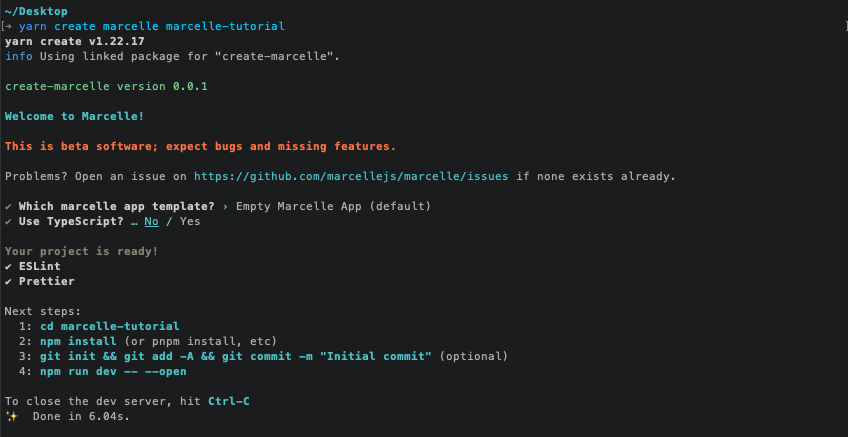
Development version
While we work on the development version, the following steps need to be taken to generate a new application:
0. Install pnpm
npm i -g pnpm1. Build a local version of Marcelle Libraries
Checkout the develop branch, install dependencies, and build all libraries:
git clone git@github.com:marcellejs/marcelle.git
cd marcelle
git checkout develop
pnpm i
pnpm build2. Generate the application
We can then generate an application, and create symbolic links to libraries compiled locally. In this example, we generate an app my-app in the parent folder to the marcelle repo.
cd ../ # or another path
node ./marcelle/packages/create-marcelle/bin.js my-app
# When prompted, select the SvelteKit+Marcelle App template
cd my-appThen, open the project in a code editor and remove the following lines from package.json:
{
  ...
  "dependencies": {
    "@marcellejs/core": "^0.6.5",
    "@marcellejs/gui-widgets": "^0.6.5",
    "@marcellejs/layouts": "^0.6.5",
    "rxjs": "^7.8.1"
  },
  ...
}Finally, we can install dependencies, and link locally:
pnpm i
pnpm link ../marcelle/packages/core; pnpm link ../marcelle/packages/gui-widgets; pnpm link ../marcelle/packages/layouts; pnpm link ../marcelle/packages/devtools; pnpm link ../marcelle/packages/tensorflowDashboard template
TODO
template description
Sveltekit template
This template provides more flexibility on the application layout. Rather than imposing a rigid dashboard interface, it generates a default application with the SvelteKit Framework. This allows to manually create various routes (or pages), with complete control over the page's markup and styling, while still facilitating the integration of Marcelle components and pipelines. Because Marcelle is a client-side library, the sveltekit application runs as a Single-Page Application (SPA). To facilitate styling, the template ships with the TailwindCSS framework and the daisyUI component library.
The typical project strucure is as follows:
my-project/
├ src/
│ ├ lib/
│ │ ├ marcelle/
│ │ │ └ [your marcelle component and pipeline definitions]
│ │ └ [your lib files]
│ ├ routes/
│ │ └ [your routes]
│ ├ app.html
│ ├ app.css
├ static/
│ └ [your static assets]
├ package.json
├ svelte.config.js
├ tsconfig.json
└ vite.config.jsThe root directory contains a number of configuration files for SvelteKit (svelte.config.js, vite.config.js), for code linting and formatting (eslint.config.js, prettier.config.mjs). The core of the project is located in the src.