Server-side Inference
Running inference in the browser can be quite expensive and not doable on smaller configurations. This chapter focuses on doing running inference of a model on a server then serving the answer to the Marcelle application.
Serving a Python Model with Ray
Ray is a powerful library for distributed computing that makes it easy to serve machine learning models. This guide provides a quick walkthrough on how to serve a Python model using Ray's Serve module for inference and send queries from a Marcelle app.
In this guide, we will implement the scenario where a pre-trained model translates a text input in English into French.
To do this, we'll be using the 🤗 HuggingFace's Transformers python library.
Note : As for every Python application, it is recommended to create a dedicated virtual environment (like a conda environment for instance) to better manage the dependencies and run the application.
Step 1: Serve a model with Ray
In this first step we will create two python files: serve_model.py and test_query.py.
Dependencies
For this example the following parts will need to install the following dependencies :
pip install serve[ray]Note : this one is to be installed with pip and not snap or apt (not to be confused with an existing Unix package called 'serve')"
pip install transformerspip install pytorchCreate a translation model
In serve_model.py, define a class to wrap your model logic using the Transformers python library. The class includes a translate method to run the inferece:
import json
from transformers import pipeline

class MyModel:
    def __init__(self):
        # Load or initialize your model here
        self.model = pipeline("translation_en_to_fr", model="t5-small")

    def translate(self, data):
        result = self.model(data['text'])
return result[0]["translation_text"]The pipeline function is defining :
- the task we want to make the model perform
- the model we want to use from Hugginface
- extra optional parameters (like the temperature)
More info on this function can be found here
Use Ray to serve the model
To serve the model using Ray Serve, you need to add the @serve.deployment decorator and add a __call__ method that handles the requests:
...
from starlette.responses import Response
from ray import serve

@serve.deployment
class MyModel:
    ...

    async def __call__(self, request):
        # Process the input and generate predictions
        data = await request.json()
        return Response(
            json.dumps({'translated_text': self.translate(data)}),
            media_type='text/json',
            headers={'Access-Control-Allow-Origin': "*"},
)The object returned is a Starlette's Response with the translated text in the form of a dict, its type and headers that allow requests from any origin (which is not very good practice for security).
Serve your model
Serve the model using the bind() method at the end of your python script:
translator = MyModel.bind()And run the following command in the terminal:
serve run serve_model:translatorBy default, the model is served on port 8000 of localhost.
Test the deployment
You can query the deployed model using any HTTP client, such as requests. test_query.py, do:
import requests

text = {"text": "Hello world!"}
url = "http://127.0.0.1:8000/"

response = requests.post(url, json=text)

print(response.json())Running this code in a terminal, with the Ray server also running, should return:
{'translated_text': 'Bonjour monde!'}Step 2: Make the query from a Marcelle app
Create a Marcelle app
Start by generating a new Marcelle app:
npm init marcelle marcelle-ray-simple
cd marcelle-ray-simple
npm installyarn create marcelle marcelle-ray-simple
cd marcelle-ray-simple
yarnpnpm create marcelle marcelle-ray-simple
cd marcelle-ray-simple
pnpm iIf you want to know more about creating Marcelle apps, see the quickstart guide
In this guide, we will work in the index.js file.
Create a simple interface to create the queries
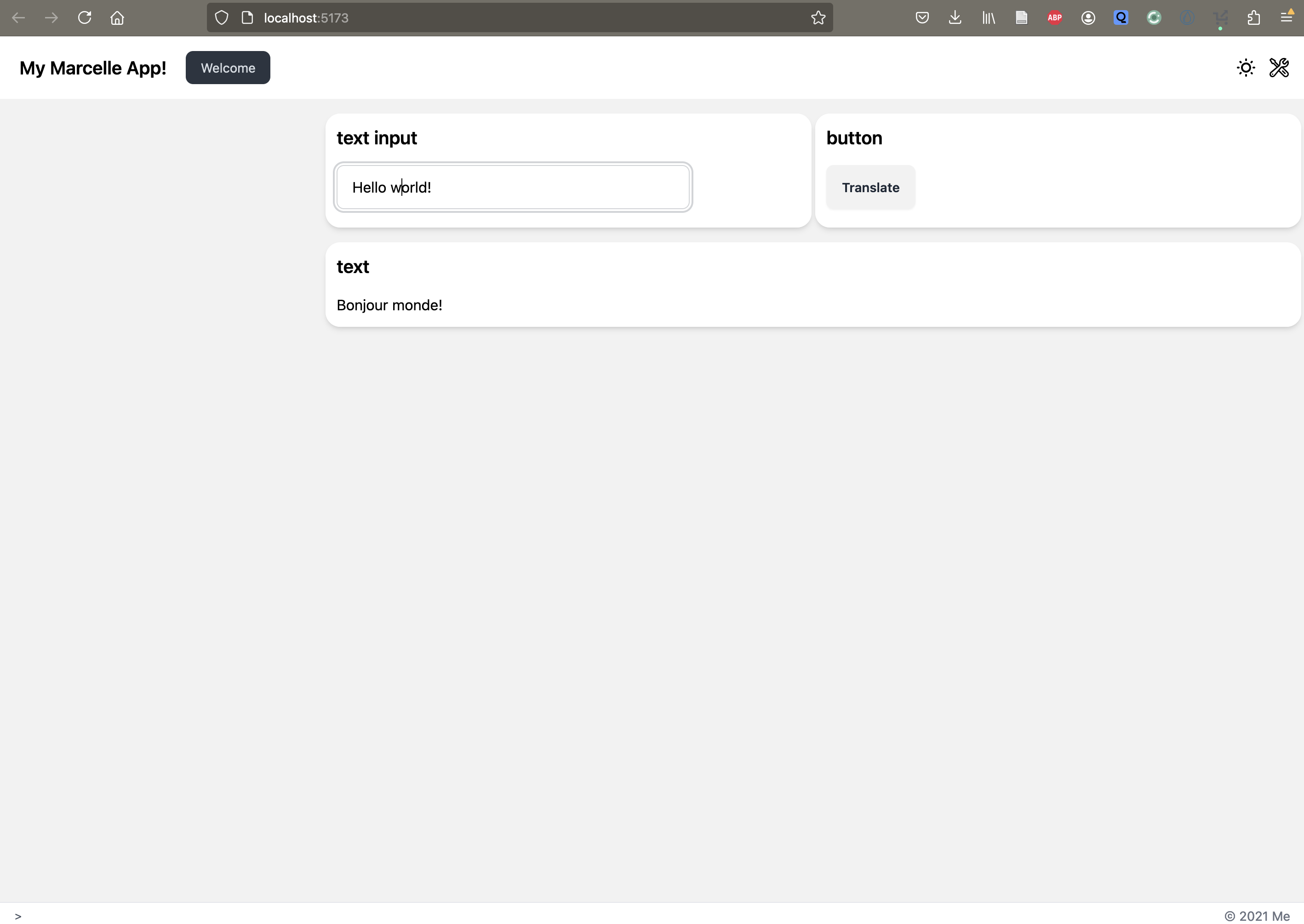
We start by creating a simple interface to interact with the translation model served up by Ray. We need a text input component to allow users to write their query (textInput component), a button that will be used to submit the query (button component) and a text field to display the response after translation (text component).
Instantiate the necessary components from the @marcellejs/gui-widgets package:
import { textInput, button, text } from '@marcellejs/gui-widgets';

const x = textInput('Query');
const t = text('Translated text');
const b = button('Translate');Add the components to the dashboard:
dash.page('Welcome').use([x, b]).use(t);Send the query
We send a request via http to the Ray server which is serving on port 8000. The query used the current value in the textInput component given by x.$value.getValue() and display the resul in the text field through t.$value.next():
function query() {
  fetch('http://127.0.0.1:8000/', {
    method: 'POST',
    body: JSON.stringify({ text: x.$value.getValue() }),
  })
    .then((response) => {
      if (!response.ok) {
        throw new Error(`HTTP error! Status: ${response.status}`);
      }
      return response.json();
    })
    .then((data) => {
      t.$value.next(data.translated_text);
      console.log('Response:', data);
    })
    .catch((error) => {
      console.error('Error:', error);
    });
}Send the query when clicking on the button:
b.$click.subscribe(() => {
  query();
});Results
This is what you should be seeing in the interface:
Conclusion
Ray Serve is widely used for deploying and scaling Python models, compatible with the usual frameworks: PyTorch, Tensorflow, Keras, Scikit-learn, HuggingFace, etc.
With Marcelle, you can easily make requests to a served model and get the results in an interface.
Serving a Model through the DataStore
TODO